Imagine if you could see your website’s search performance and social traction in a single channel.
That’s exactly the Search Console unified site and social view. This feature brings your website and selected social media data together in one place, so marketers can see how visibility works across platforms.
Learning about the functionality of the unified view can assist you in smarter reporting, better decisions, and stronger alignment for your SEO strategy and social media efforts.
Why Marketers Needed a Unified Dashboard
Most teams spend way too much time stitching data together, toggling between multiple tabs. SEO tools show search visibility. Social platforms show engagement. Analytics tools show behavior after the click.
The problem is that none of these shows performance before the click, making discoverability tracking difficult, and the fragmentation creates blind spots.
A blog post might underperform in organic clicks but drive strong social engagement. A social post might spark branded searches that never get credited back to the platform. Teams saw pieces of the story but missed the full picture.
As discovery moves beyond traditional search, tracking visibility has become more difficult. With 15% of consumers expecting brands to provide accurate information on social media, there is more pressure to keep information consistent across all channels.
Marketers needed to know how content performs across different channels, not just within each one, which is why the Search Console unified site and social view is a game-changer.
How the Unified View Works
The unified view, still in its experimental stage, integrates website and social media analytics into a single environment rather than treating them as separate efforts. It shows how they contribute to overall discoverability.
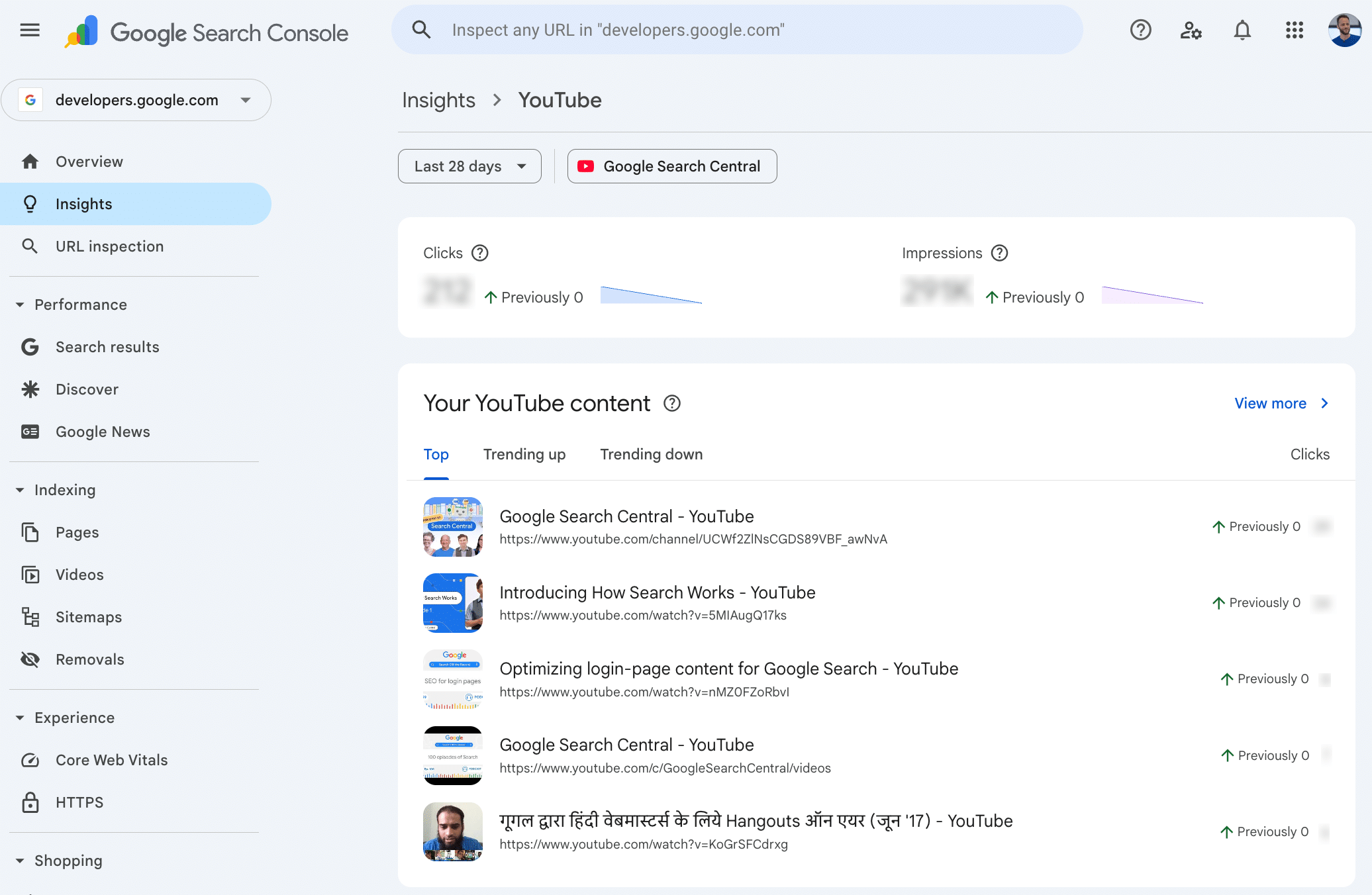
The unified dashboard complements Google Analytics 4 (GA4) but does not replace it. GA4 looks at what users do after they click, while this unified view shows visibility, reach, and performance before the click across different platforms.
Google Search Console has identified metrics that you can view within the dashboard:
- Total reach: Clicks and impressions, driving traffic from Google to your site or social profiles
- Content performance: Top-performing and trending pages or posts
- Search queries: Queries leading users to your website or socials
- Audience location: Top countries where users engage most with your content
- Additional traffic sources: Clicks from sources such as Image Search, Video Search, News Search, and Discover
Benefits for SEO, Content, and Social Teams
The biggest advantage of Google Search Console’s unified view updates is the clarity they provide. When teams share the same data source, alignment becomes easier and faster. Here’s how this approach delivers even more value across your marketing efforts in 2026.
Attribution Clarity Across Channels
Ever wonder if your latest LinkedIn post actually increased search demand? The unified view shows how visibility changes and how content performs across channels over time.
Teams can now spot patterns instead of guessing where the impact originated. This clarity reduces internal debates and improves confidence in reporting.
Performance Benchmarking
Search and social should not operate in silos. They work best as counterparts to improve your brand’s online visibility and discovery. When teams view them as connected channels, performance insights become clearer and more actionable.
SEO teams can see which pages earn organic visibility but lack social engagement. Social teams, on the other hand, can identify content that drives engagement but needs stronger search optimization.
Instead of relying on separate multi-channel SEO tools, teams can evaluate performance holistically in a single space, without adding extra tools or manual work.
Streamlined Reporting Workflows
Reporting often consumes more time than analysis. The unified view simplifies reporting by centralizing key metrics in one interface, making cross-channel performance reporting more efficient.
This also reduces spreadsheet-heavy workflows and supports faster insights for internal teams and clients. Agencies managing multiple accounts benefit from cleaner comparisons and clearer storytelling.
Getting Started With the Unified Dashboard
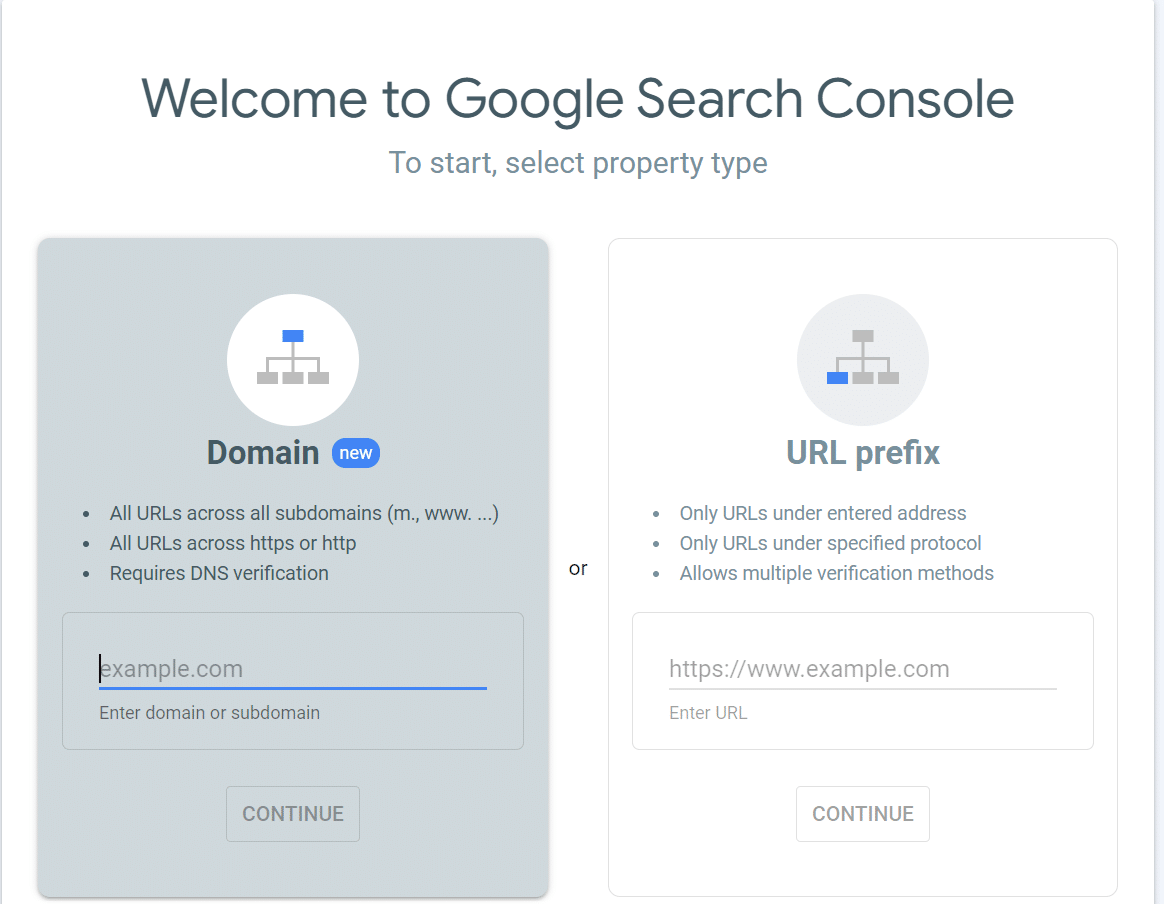
Setting up the unified view starts with verification.
First, confirm ownership of your website in Search Console. Next, link verified social profiles to enable data sharing. Once connected, the dashboard begins consolidating performance data.
To get the most value from the unified marketing dashboard:
- Use filters to compare time periods and channels
- Segment by content type or topic
- Review weekly and monthly trends
Key Takeaways
The Search Console unified site and social view gives marketers the cross-channel visibility they’ve been waiting for. It bridges SEO and social insights into one streamlined reporting experience.
If you want better reporting and smarter decision-making, explore the unified dashboard inside Search Console. Use it to refine your content strategy, align teams, and improve performance across search and social platforms. We, at Marketing Done Right, can help you get started.
The future of marketing isn’t siloed—it’s unified.
Frequently Asked Questions
1. What metrics are shown in the unified view?
According to Google, the insights will include the following metrics for each channel:
- Total reach
- Content performance
- Search queries
- Audience location
- Additional traffic sources
2. Can I compare website and social data side by side?
Yes. The unified view displays side-by-side data from your site and linked social channels, highlighting which platforms enhance visibility and engagement. You can apply filters and comparisons to monitor performance trends over time.
3. Does this replace Google Analytics or Data Studio?
No. It complements GA4 and other reporting tools by focusing specifically on search-driven visibility.
4. Who can access this feature?
Access will depend on Google’s Search Console property verification and eligibility since it is still in an experimental stage.
5. How do I link my social channels?
Once your site is verified, the dashboard prompts you to add and authorize your social profiles, like YouTube, TikTok, and Instagram, that Search Console has automatically identified and associated with your website.